Contour features (box, circle, hull) — computer vision in the browser
Once you have a contour you can measure it: cv2.boundingRect, cv2.minEnclosingCircle and cv2.convexHull wrap a shape three useful ways, plus area and perimeter — building blocks for counting and sizing objects in computer vision. Run it live.
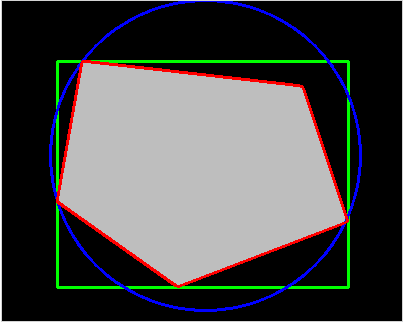
Example code (Python / OpenCV)
"""
Contour features (box, circle, hull)

Once you have a contour you can measure it: cv2.boundingRect, cv2.minEnclosingCircle and cv2.convexHull wrap a shape three useful ways, plus area and perimeter — building blocks for counting and sizing objects in computer vision. Run it live.
"""

import cv2
import numpy as np

# One blob, described three ways
img = np.zeros((320, 400, 3), np.uint8)
poly = np.array([[80, 60], [300, 85], [345, 220], [175, 285], [55, 200]], np.int32)
cv2.fillPoly(img, [poly], (190, 190, 190))
gray = cv2.cvtColor(img, cv2.COLOR_BGR2GRAY)
c = max(cv2.findContours(gray, cv2.RETR_EXTERNAL, cv2.CHAIN_APPROX_SIMPLE)[0], key=cv2.contourArea)

x, y, w, h = cv2.boundingRect(c)
cv2.rectangle(img, (x, y), (x + w, y + h), (0, 255, 0), 2)             # bounding box
(cx, cy), r = cv2.minEnclosingCircle(c)
cv2.circle(img, (int(cx), int(cy)), int(r), (255, 0, 0), 2)           # min enclosing circle
cv2.drawContours(img, [cv2.convexHull(c)], -1, (0, 0, 255), 2)        # convex hull
print("area=%.0f  perimeter=%.0f" % (cv2.contourArea(c), cv2.arcLength(c, True)))
cv2.imshow("features", img)