GrabCut foreground extraction — computer vision in the browser
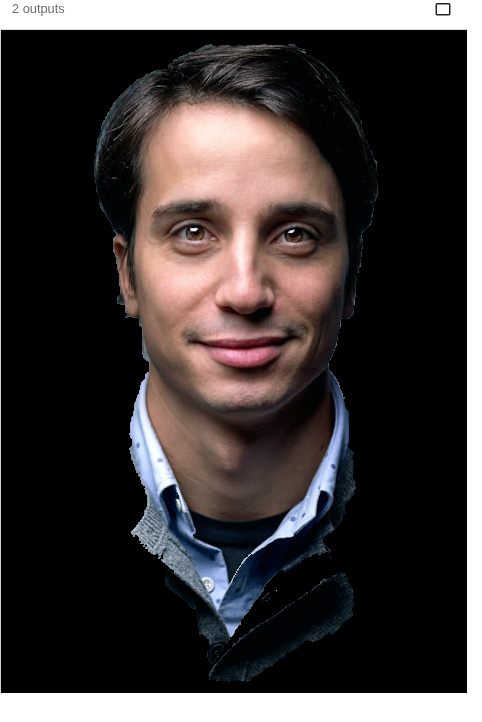
GrabCut separates a subject from its background from just a rough box, iteratively refining a colour model — the idea behind one-click background removal in computer vision. This fetches a portrait and runs cv2.grabCut (a few seconds). Run it live.
Example code (Python / OpenCV)
"""
GrabCut foreground extraction

GrabCut separates a subject from its background from just a rough box, iteratively refining a colour model — the idea behind one-click background removal in computer vision. This fetches a portrait and runs cv2.grabCut (a few seconds). Run it live.
"""

import cv2
import requests
import numpy as np

# A real photo, fetched live from the web — nothing is uploaded
url = "https://images.unsplash.com/photo-1500648767791-00dcc994a43e?w=480&q=70"
# no-cache: always fetch a fresh copy so a stale browser-cache entry can't break decoding
resp = requests.get(url, headers={"Cache-Control": "no-cache"})
img = cv2.imdecode(np.frombuffer(resp.content, np.uint8), cv2.IMREAD_COLOR)

mask = np.zeros(img.shape[:2], np.uint8)
h, w = img.shape[:2]
rect = (int(0.08 * w), int(0.06 * h), int(0.86 * w), int(0.9 * h))   # box around the subject
bgd = np.zeros((1, 65), np.float64)
fgd = np.zeros((1, 65), np.float64)
cv2.grabCut(img, mask, rect, bgd, fgd, 5, cv2.GC_INIT_WITH_RECT)   # 5 iterations (slow)
fg = np.where((mask == 1) | (mask == 3), 255, 0).astype(np.uint8)
cv2.imshow("original", img)
cv2.imshow("foreground", cv2.bitwise_and(img, img, mask=fg))