Hough circle transform — computer vision in the browser
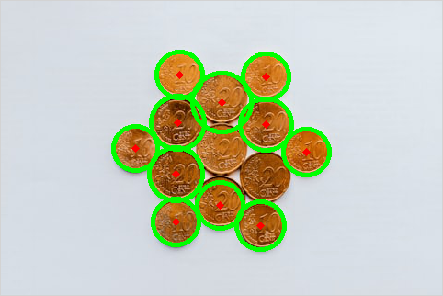
The Hough circle transform finds circles by voting for centre + radius — handy for coins, pupils and dials in computer vision. This fetches a photo of round objects and runs cv2.HoughCircles. Run it live and tweak the radius range and sensitivity.
Example code (Python / OpenCV)
"""
Hough circle transform

The Hough circle transform finds circles by voting for centre + radius — handy for coins, pupils and dials in computer vision. This fetches a photo of round objects and runs cv2.HoughCircles. Run it live and tweak the radius range and sensitivity.
"""

import cv2
import requests
import numpy as np

# A real photo, fetched live from the web — nothing is uploaded
url = "https://images.unsplash.com/photo-1589556763393-59ab0f56b811?w=480&q=70"
# no-cache: always fetch a fresh copy so a stale browser-cache entry can't break decoding
resp = requests.get(url, headers={"Cache-Control": "no-cache"})
img = cv2.imdecode(np.frombuffer(resp.content, np.uint8), cv2.IMREAD_COLOR)

gray = cv2.medianBlur(cv2.cvtColor(img, cv2.COLOR_BGR2GRAY), 5)
circles = cv2.HoughCircles(gray, cv2.HOUGH_GRADIENT, 1, 34,
                           param1=110, param2=30, minRadius=20, maxRadius=46)
if circles is not None:
    for x, y, r in np.uint16(np.around(circles))[0]:
        cv2.circle(img, (x, y), r, (0, 255, 0), 3)
        cv2.circle(img, (x, y), 2, (0, 0, 255), 3)
cv2.imshow("circles", img)