Hough line transform — computer vision in the browser
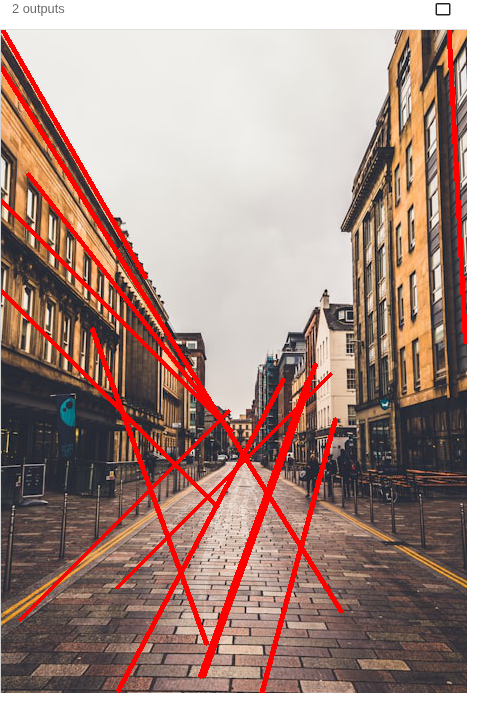
The Hough line transform finds straight lines in an edge map by voting in line-parameter space — used to detect roads, buildings and document borders in computer vision. This fetches a street photo, runs Canny, then cv2.HoughLinesP. Run it live and tweak the thresholds.
Example code (Python / OpenCV)
"""
Hough line transform

The Hough line transform finds straight lines in an edge map by voting in line-parameter space — used to detect roads, buildings and document borders in computer vision. This fetches a street photo, runs Canny, then cv2.HoughLinesP. Run it live and tweak the thresholds.
"""

import cv2
import requests
import numpy as np

# A real photo, fetched live from the web — nothing is uploaded
url = "https://images.unsplash.com/photo-1543872084-c7bd3822856f?w=480&q=70"
# no-cache: always fetch a fresh copy so a stale browser-cache entry can't break decoding
resp = requests.get(url, headers={"Cache-Control": "no-cache"})
img = cv2.imdecode(np.frombuffer(resp.content, np.uint8), cv2.IMREAD_COLOR)

gray = cv2.cvtColor(img, cv2.COLOR_BGR2GRAY)
edges = cv2.Canny(gray, 100, 200)

# Probabilistic Hough — high threshold + long minLineLength keeps only strong segments
lines = cv2.HoughLinesP(edges, 1, np.pi / 180, 120, minLineLength=110, maxLineGap=12)
if lines is not None:
    # keep the longest lines so the dominant structure stands out, not the texture noise
    seg = sorted(lines[:, 0], key=lambda l: (l[0] - l[2]) ** 2 + (l[1] - l[3]) ** 2, reverse=True)
    for x1, y1, x2, y2 in seg[:14]:
        cv2.line(img, (x1, y1), (x2, y2), (0, 0, 255), 3)
cv2.imshow("edges", edges)
cv2.imshow("lines", img)