Shape detection (approxPolyDP) — computer vision in the browser
Shape detection turns a contour into a named shape by counting its corners: cv2.approxPolyDP simplifies the outline, and the vertex count tells triangle from rectangle from circle. A staple computer-vision exercise. Run it live and tweak the approximation factor.
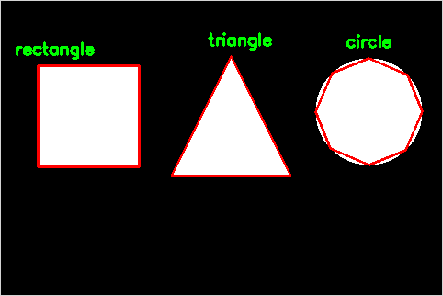
Example code (Python / OpenCV)
"""
Shape detection (approxPolyDP)

Shape detection turns a contour into a named shape by counting its corners: cv2.approxPolyDP simplifies the outline, and the vertex count tells triangle from rectangle from circle. A staple computer-vision exercise. Run it live and tweak the approximation factor.
"""

import cv2
import numpy as np

# Draw a few shapes, then let the contour tell us what each one is
img = np.zeros((320, 480, 3), np.uint8)
cv2.rectangle(img, (40, 70), (150, 180), (255, 255, 255), -1)
cv2.circle(img, (400, 120), 58, (255, 255, 255), -1)
tri = np.array([[250, 60], [315, 190], [185, 190]], np.int32)
cv2.fillPoly(img, [tri], (255, 255, 255))

gray = cv2.cvtColor(img, cv2.COLOR_BGR2GRAY)
cnts, _ = cv2.findContours(gray, cv2.RETR_EXTERNAL, cv2.CHAIN_APPROX_SIMPLE)
for c in cnts:
    approx = cv2.approxPolyDP(c, 0.04 * cv2.arcLength(c, True), True)   # tweak 0.04
    name = {3: "triangle", 4: "rectangle", 5: "pentagon"}.get(len(approx), "circle")
    x, y = approx[0][0]
    cv2.drawContours(img, [approx], -1, (0, 0, 255), 2)
    cv2.putText(img, name, (x - 25, y - 12), cv2.FONT_HERSHEY_SIMPLEX, 0.6, (0, 255, 0), 2)
cv2.imshow("shapes", img)