Template matching — computer vision in the browser
Template matching slides a small template over an image and reports where it fits best — the simplest way to locate a known object in computer vision. This fetches a photo, cuts a patch from it, and finds it again with cv2.matchTemplate. Run it live.
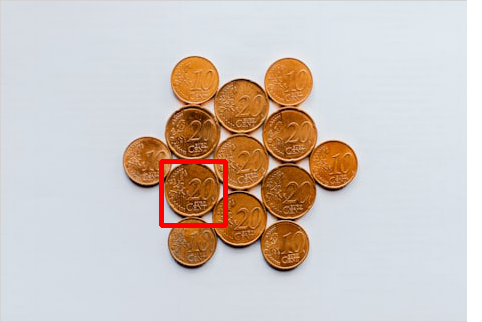
Example code (Python / OpenCV)
"""
Template matching

Template matching slides a small template over an image and reports where it fits best — the simplest way to locate a known object in computer vision. This fetches a photo, cuts a patch from it, and finds it again with cv2.matchTemplate. Run it live.
"""

import cv2
import requests
import numpy as np

# A real photo, fetched live from the web — nothing is uploaded
url = "https://images.unsplash.com/photo-1589556763393-59ab0f56b811?w=480&q=70"
# no-cache: always fetch a fresh copy so a stale browser-cache entry can't break decoding
resp = requests.get(url, headers={"Cache-Control": "no-cache"})
img = cv2.imdecode(np.frombuffer(resp.content, np.uint8), cv2.IMREAD_COLOR)

gray = cv2.cvtColor(img, cv2.COLOR_BGR2GRAY)
# Cut a patch out of the image, then find it again with matchTemplate
th, tw = 64, 64
ty, tx = gray.shape[0] // 2, gray.shape[1] // 3
templ = gray[ty:ty + th, tx:tx + tw]
res = cv2.matchTemplate(gray, templ, cv2.TM_CCOEFF_NORMED)
_, _, _, loc = cv2.minMaxLoc(res)
cv2.rectangle(img, loc, (loc[0] + tw, loc[1] + th), (0, 0, 255), 3)
cv2.imshow("template", templ)
cv2.imshow("found", img)